Many companies in the manufacturing sector face a silent but pressing challenge: the industry-specific software that has reliably served them for years is based on a technological foundation that is increasingly becoming a risk. Visual Basic, Windows Forms, locally installed databases: systems that were once state of the art are today difficult to maintain, hardly expandable, and tie valuable know-how to outdated platforms. According to the study "Legacy Modernization 2024" by CIO, CSO and Computerwoche, 46 percent of surveyed companies state that legacy systems are associated with high operating costs, and over 40 percent report restrictions on their business activities. A Lünendonk study from 2025 complements the picture: in 62 percent of companies, parts of business-critical applications are so outdated that they no longer meet today's requirements, and in every second company, the operation, maintenance, and further development of legacy systems is no longer assured in the medium to long term.
The central question is not whether modernization is necessary, but how it can succeed without jeopardizing ongoing operations and without losing the experience embedded in the existing solution. It becomes particularly challenging when the software is not only used in the office, but directly on the shop floor, in production halls, or at locations without stable internet connectivity.
This is precisely where we at mindtwo come in: with a well-thought-out architecture approach that transforms legacy applications into modern, hybrid cloud solutions, including complete offline capability.
Why Legacy Desktop Software Becomes a Strategic Risk
Industry-specific desktop applications (such as configurators, calculation tools, or planning systems) are deeply embedded in the daily work routine of many industrial companies. They work, are used daily, and deliver reliable results. But beneath the surface, problems are growing:
- Technological dead end: Frameworks like Visual Basic 6 or older .NET versions are no longer actively developed. Finding developers who can still maintain these systems is becoming increasingly difficult and expensive.
- Lack of connectivity: Local desktop applications can hardly be meaningfully connected to other systems, neither with ERP, CRM, nor with modern data platforms. Data remains trapped in silos.
- Limited scalability: New locations, additional users, or changed requirements often require manual installations, individual updates, and complex data synchronization.
- Security risks: With discontinued frameworks, security vulnerabilities remain open because patches and updates are no longer delivered. In times of increasing cyber threats, this is a serious risk.
- Know-how dependency: When the few people who still understand the system leave the company, operations face a veritable problem.
Consistent modernization can break this cycle: ongoing support costs can be reduced, efficiency increased, and critical business processes made future-proof. The decisive factor is that the migration is not understood as a pure IT project, but as a strategic investment in the company's future viability.
The Solution Approach: Hybrid Cloud Architecture with Offline Capability
Not every modernization must mean moving everything to the cloud and relying on permanent connectivity. Especially in industrial environments (in production halls, on machines, in areas with limited or no internet connection), a more differentiated approach is needed.
What does "hybrid" mean in this context?
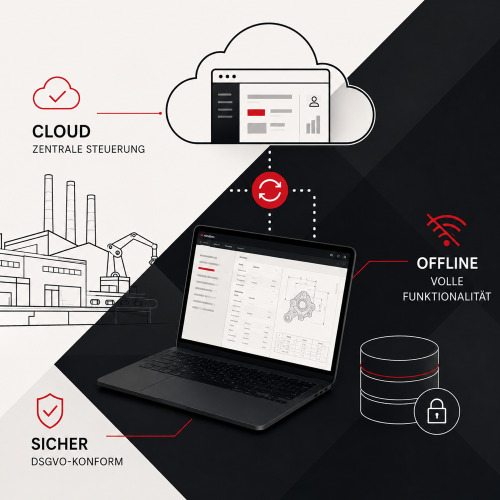
A hybrid cloud architecture combines the advantages of a central, cloud-based platform with the reliability of local applications. Specifically, this means:
- Cloud component: A central admin portal for master data management, user management, and configuration, accessible via browser, hosted on secure, GDPR-compliant servers.
- Local component: A desktop application that is fully functional even without internet connection and can execute all calculations, configurations, and outputs locally.
- Synchronization: Encrypted data exchange between cloud and local instance as soon as a connection is available, alternatively via manual import/export for completely isolated environments (so-called air-gap scenarios).
This approach ensures that the software works reliably where it is needed, even under difficult conditions.
The Technological Foundation
For implementing such hybrid solutions, we rely on a proven, future-proof tech stack:
| Layer | Technology | Why? |
|---|---|---|
| Backend | PHP / Laravel | Mature framework with excellent API support, large community, and long-term maintainability |
| Frontend | Vue.js / TypeScript | Reactive, performant user interfaces with strong type safety |
| Desktop Wrapper | Electron | Enables native desktop applications based on the same web technologies |
| Local Database | SQLite | Lightweight, serverless, ideal for local data storage and offline scenarios |
| Infrastructure | Docker, CDN, German servers | Reproducible deployments, fast delivery, GDPR compliance |
The decisive advantage of this stack: all technologies are Open Source. This means no license costs, no dependency on individual software vendors, and a broad base of available know-how.
Shared Codebase: Develop Once, Use Everywhere
One of the biggest challenges with hybrid solutions is the question: How do I avoid developing the same logic twice, once for the web version and once for the desktop version?
Our approach relies on a shared codebase. This means:
- Calculation logic, validation rules, and business logic are implemented in TypeScript, written once, and executed both in the browser and in the Electron desktop app.
- UI components based on Vue.js are also shared. The user interface looks and behaves identically in both environments.
- API interfaces follow a uniform pattern, so that the local SQLite database and the cloud database are accessed via the same interfaces.
The result: drastically reduced development and maintenance effort, consistent behavior across all platforms, and the assurance that a bug fix or new feature is automatically available in both variants.
Offline Capability as Core Architecture, Not as a Workaround
Many modern web applications treat offline capability as an afterthought: a service worker here, a local cache there. For industrial applications deployed on shop floors or in production environments, this is not sufficient.
We design offline capability from the outset as an architectural principle:
Local Data Storage with SQLite
The desktop variant works with a complete local SQLite database. All relevant master data, configurations, and calculation bases are available locally. The application is therefore fully usable even when there is no network connection whatsoever.
Bidirectional Synchronization
As soon as an internet connection is available, the local and cloud databases synchronize via a TLS-encrypted REST API. Conflicts are resolved via defined rules, such as timestamp-based prioritization or explicit approval workflows.
Air-Gap Support
For particularly sensitive or completely isolated environments, we offer a manual import/export mechanism. Data updates can be transferred via encrypted files on USB sticks. This initially sounds unusual, but is a real requirement in many industrial environments, such as in security-critical areas or at locations without any network infrastructure.
Migration: The Path from Old to New
The technically cleanest architecture is of little use if the migration itself fails. A structured approach is therefore at least as important as the target architecture.
Phase 1: Analysis and Inventory
At the beginning is a thorough analysis of the existing application:
- Which functions are actually used, which are obsolete?
- What calculation logics and business rules are in the code, and are they documented?
- What interfaces to other systems exist?
- What data needs to be migrated, in what quality is it available?
- What do the actual usage scenarios look like: Who works where, when, and under what conditions with the software?
Phase 2: Design and Architecture
Based on the analysis, the technical concept is developed: data model, API design, component architecture, synchronization logic, and security concept. In parallel, UX/UI concepts are developed that respect existing workflows and systematically improve them.
Phase 3: Iterative Implementation
Development takes place in manageable iterations. Core functions are implemented first and can be tested early. This reduces risks and allows feedback from actual use to flow into development in a timely manner.
Phase 4: Data Migration and Parallel Operation
Existing data is carefully transferred to the new system. In a transition phase, old and new solutions run in parallel. This allows results to be compared and the correctness of the migration to be validated.
Phase 5: Rollout and Training
The rollout takes place gradually, ideally first at a pilot location before the solution is rolled out company-wide. Particularly important: the familiar output formats (such as PDF plans or reports) are retained. This significantly lowers the entry barrier and creates acceptance among users.
User Continuity: The Underestimated Success Criterion
Technical modernization rarely fails because of the technology itself, but because of acceptance. When long-time users are suddenly faced with a completely different interface, their familiar workflows no longer work, or proven output formats disappear, a progress project quickly becomes a frustration project.
Therefore, we place special emphasis on user continuity during migration:
- Proven workflows are retained and only changed where a clear added value exists.
- Output formats such as PDF plans, parts lists, or configuration reports are replicated exactly.
- The operating logic is based on familiar patterns, complemented by contemporary UX improvements.
- Training effort is minimized through intuitive interfaces and a familiar information architecture.
Security and Compliance
Especially when configuration data, technical drawings, or calculation bases are processed in a cloud environment, security and data protection are non-negotiable options.
Our security concept for hybrid industrial solutions includes:
- GDPR-compliant hosting on German servers
- Role-based access control (RBAC): Administrators, editors, and end users receive exactly the rights they need for their tasks
- TLS encryption for all data transfers between client and server
- DDoS protection via CDN infrastructure
- Encrypted local data storage in the desktop variant
- Audit trails for traceable changes to critical data
Long-term Benefits: What Modernization Concretely Brings
The investment in a hybrid cloud architecture pays off on multiple levels:
| Dimension | Before (Legacy Desktop) | After (Hybrid Cloud Solution) |
|---|---|---|
| Maintenance & Updates | Manual installation at every workstation | Central updates, automatic synchronization |
| Scalability | New locations = new installations | Onboard new users in minutes |
| Data Integration | Isolated data storage, no API access | REST API for connection to ERP, CRM, BI |
| Security | No updates, no encryption | Current security standard, GDPR-compliant |
| Availability | Only on the installed PC | Web + desktop, online + offline |
| Development Costs | Niche framework, expensive specialists | Modern open-source basis, broad talent pool |
| Know-how Risk | Few people master the code | Standard technologies, documented architecture |
When is the Right Time?
There are typical signals that indicate that modernization should no longer be postponed:
- The developers who originally built the system are no longer available.
- Security updates for the underlying framework have been discontinued.
- New requirements (such as connection to an ERP system or mobile use) can no longer be implemented with the existing architecture.
- The costs for maintenance and troubleshooting are rising disproportionately.
- Employees bypass the system because it is too cumbersome or too slow.
If several of these points apply, the time is not only right, but overdue. That the topic has long since appeared on investment plans is also shown by the Lünendonk study: 83 percent of surveyed companies plan to increase their IT modernization budget in 2026, almost every fourth company by more than five percent. 76 percent expect that at least 20 percent of their business-critical core applications will need to be modernized in the next five years. Those who postpone the step for too long risk not only technical debt, but also an increasing competitive gap.
Conclusion: Modernization as Opportunity, Not as Risk
Modernizing legacy software does not mean throwing proven processes overboard. It means preserving the substance (the calculation logic, the configuration depth, the expertise grown over years) and placing it on a sustainable, future-proof foundation.
A hybrid cloud architecture with offline capability combines the best of both worlds: the reliability and independence of a local application with the flexibility, scalability, and connectivity of a modern cloud platform.
We at mindtwo accompany companies from the industry sector precisely on this path, from strategic analysis through technical design to implementation and long-term operation of custom web applications and software solutions. If you are facing a similar challenge, we would be happy to discuss what a structured modernization path could look like for your situation.